

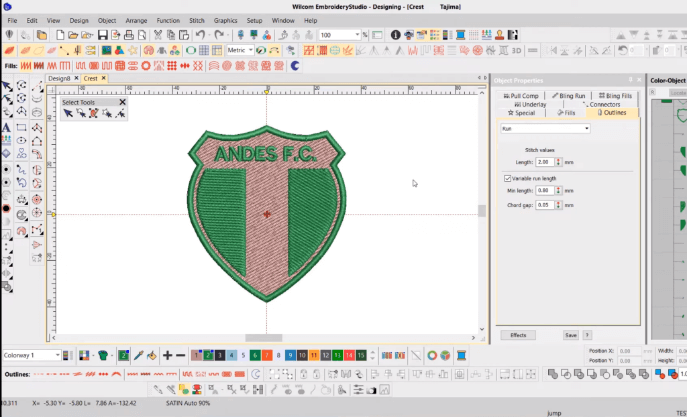
Embroidery machines do not understand image files the way humans do. A JPG may look perfect on a screen, but an embroidery machine cannot stitch pixels. This is where digitizing becomes essential. Converting artwork from JPG into embroidery-ready files is a critical step for anyone working with machine embroidery. Understanding how JPG to DST conversion works helps avoid stitching errors, wasted materials, and production delays.
The dst file format is one of the most widely used embroidery formats in the industry. It stores stitch instructions instead of visual data, allowing embroidery machines to follow precise commands. For beginners, professionals, and every embroidery business, learning how JPG designs are converted into DST files is key to achieving clean and professional embroidery results.
What Is JPG to DST Conversion in Embroidery
JPG to DST conversion is the process of turning a standard image file into an embroidery stitch file. A JPG contains color pixels and visual details, while a DST file contains stitch paths, directions, and commands for embroidery machines. This conversion is done through embroidery digitizing, not simple file saving.
During conversion, the digitizer decides how the design will be stitched. This includes choosing stitch types, stitch direction, density, and sequence. Automated conversion tools often fail to handle complex designs properly, which is why professional embroidery digitizing is usually required for accurate results.
Understanding this difference helps explain why JPG files cannot be stitched directly and why proper digitizing is essential for quality embroidery.
Why the DST File Format Is Important for Embroidery
The dst file format is widely accepted by commercial and industrial embroidery machines. It was developed to store stitch data efficiently and reliably. Instead of storing images, it records needle movements, stitch lengths, and jump commands.
One major advantage of the DST format is its compatibility. Many embroidery machines support it without requiring additional conversion. This makes it a standard choice for production environments where consistency and speed matter.
Because the DST format focuses on stitch instructions, it ensures that designs run smoothly on machines. This reliability is why it is commonly requested by embroidery professionals and manufacturers.
Understanding the DST File Format Structure
The dst file format contains specific embroidery commands that guide machine operation. It includes stitch coordinates, color change commands, and jump instructions. However, it does not store detailed color previews, which is why DST files may look simply when opened in basic viewers.
This structure keeps file sizes small and processing fast. For embroidery machines, this efficiency is critical. Machines read DST files quickly and execute stitches accurately when digitizing is done correctly.
Knowing how this format works helps embroiderers understand why proper digitizing matters more than the original image quality.
How Embroidery Digitizing Converts JPG to DST
Embroidery digitizing is the core process behind JPG to DST conversion. A digitizer imports the JPG into specialized software and manually assigns stitches to each design element. This step translates visual shapes into stitch logic.
Professional embroidery digitizing considers fabric type, design size, and machine behavior. Stitch density and underlay are adjusted to prevent puckering and distortion. This process ensures that the final DST file produces clean and durable embroidery.
Without proper digitizing, converted files often cause thread breaks, uneven fills, and misaligned designs.
Why Embroidery Digitizing Services Are Preferred
Many businesses rely on embroidery digitizing services for JPG to DST conversion. These services employ skilled digitizers who understand stitch behavior and machine limitations. Their experience ensures accurate and production-ready files.
Using embroidery digitizing services saves time and reduces costly mistakes. Instead of trial and error, businesses receive tested files that run smoothly on machines. This is especially helpful for complex logos or bulk orders.
For growing embroidery operations, outsourcing digitizing allows focus on production and customer satisfaction while maintaining quality standards.
Common Mistakes in JPG to DST Conversion
One common mistake is assuming conversion is automatic. Simple software tools often create messy stitch paths. Another mistake is ignoring fabric type. Designs digitized for flat cotton may fail on stretchy or thick materials.
Overlooking stitch density is another issue. Too many stitches make designs stiff, while too few cause gaps. These errors usually stem from poor embroidery digitizing rather than image quality.
Understanding these mistakes highlights the importance of professional conversion methods.
How JPG Quality Affects DST Conversion
Image quality matters during conversion. Clean, high-resolution JPG files produce better digitizing results. Blurry or pixelated images make it difficult to define edges and shapes.
However, even high-quality images require manual digitizing. The machine does not recognize shapes automatically. The digitizer interprets the image and assigns stitches accordingly.
Providing clean artwork improves results, but digitizing skill ultimately determines embroidery quality.
JPG to DST Conversion for Commercial Use
For any embroidery business, reliable JPG to DST conversion is essential. Commercial embroidery requires consistency across multiple garments and machines. A well-digitized DST file ensures repeatable results.
Poor conversion leads to production delays, wasted thread, and damaged fabric. Over time, these losses affect profitability. Investing in quality digitizing reduces machine downtime and improves output efficiency.
Businesses that prioritize accurate conversion build stronger client trust and long-term success.
Why DST Is Commonly Used in the Embroidery Industry
DST files are widely used because they are simple, reliable, and machine-friendly. They work well for logos, text, and standard embroidery designs. Many manufacturers recommend DST for compatibility reasons.
While other formats exist, DST remains a go-to choice for many professionals. Its efficiency makes it suitable for high-volume embroidery environments.
Understanding industry preferences helps businesses meet client and machine requirements easily.
Choosing the Right Conversion Method
You can convert JPG to DST using software or professional services. Software may work for learning, but results vary. Professional services deliver consistent quality.
Embroidery digitizing services provide revisions, testing, and expert adjustments. This ensures the final file matches production needs. For beginners, learning digitizing helps understanding, but outsourcing ensures reliability.
Choosing the right method depends on design complexity, order volume, and quality expectations.
Future of JPG to DST Conversion
As embroidery technology evolves, digitizing tools continue to improve. Software offers better simulations and control, but human expertise remains essential.
Demand for custom embroidery is growing. Accurate conversion from JPG to DST will remain a core requirement. Businesses that invest in quality digitizing will stay competitive in the long run.
Conclusion
JPG to DST conversion is a vital step in machine embroidery, transforming visual artwork into stitch-based instructions. Understanding the process, the role of digitizing, and the importance of file formats helps avoid common errors and ensures professional results. For embroidery professionals and businesses seeking reliable and affordable conversion support, 1dollardigitizing offers a practical solution for consistent and production-ready embroidery files.

